Burning Bridges AI logoBurning Bridges AI
  • Home
  • Guides
TOOLS
  • Rumpelstiltskin AI
  • Bulin 47 AI
MORE
  • Pricing

Guest

Save your creations

Credits—
  1. Home
  2. /
  3. Bulin 47 AI

PHOTO TO FREESTYLE

Bulin 47 AI Video Generator

Your photo. A red neon street. Your freestyle moment.

Turn your photo into a nighttime freestyle moment with Bulin 47 AI. Bring your own look to a dembow street performance without filming yourself or writing a prompt.

Create your freestyle video
  • One starting photo
  • No prompt writing
  • Adjustable video settings
Bulin 47 AI freestyle video example.

Your video workspace

Sign in to choose a reference image and see your creations.

Reference image

Required · 1 image
10
Checking your sign-in status…

What is Bulin 47 AI?

Bulin 47 AI is a photo animation tool for making your own interpretation of the freestyle meme. It gives a still portrait a performance role, turning an expression and an outfit into the starting point for a short creative clip. You choose who takes center stage; the preset supplies the direction.

The appeal is the contrast between an ordinary photograph and a confident performance. A casual selfie can suggest a playful alter ego, while a carefully chosen outfit can make the same concept feel theatrical. Think about the character you want the viewer to recognize before choosing which image to animate.

Use Bulin 47 AI for a personal meme, a reaction clip, or a short character introduction. Each idea can begin with a different expression or wardrobe while keeping the same freestyle theme. A restrained portrait may create a different impression from a smiling one, even when the output settings remain identical.

How to make a Bulin 47 AI video

You do not need to film a dance or write a scene description. The Bulin 47 AI workflow keeps your main choices focused on the photo and output settings.

  1. 01

    Choose the person in your photo

    Sign in and upload a photo, or select an available image from your library. Check the thumbnail to confirm that you selected the intended file. JPG, PNG, and WebP uploads are supported, with a 10 MB limit. Replace an accidental selection before moving on to the output controls.

  2. 02

    Review the format and credit estimate

    Open Generation settings and review the controls before submitting. Bulin 47 AI shows a compact summary beside the composer, so you can confirm your choices after closing the panel. Check the credit estimate beside Generate; decide whether the proposed clip fits your budget before starting the request.

  3. 03

    Generate, watch, and download

    Submit once and follow the task in the history above the composer. Open the completed clip to watch it, then download the version you want to keep. Use again restores the earlier inputs for another attempt without submitting automatically, giving you a chance to review or adjust them first.

Inside the Bulin 47 AI street scene

A performer, a speaker, and a circle of phones

Bulin 47 AI asks for a centered performer with energetic movement that reads clearly on a small screen. The speaker holder gives the performance a visual partner, while the raised phones establish a crowd watching the same moment. Restaurant steps and bright red lighting provide a recognizable backdrop without needing a set or location shoot.

The requested movement combines shoulder bounces, hand chops, pointing toward the camera, and changes in head position. Warm red neon mixes with cool street light, while a little grain and handheld movement suggest a spontaneous phone recording. These details give the Bulin 47 AI preset its visual rhythm and nighttime atmosphere.
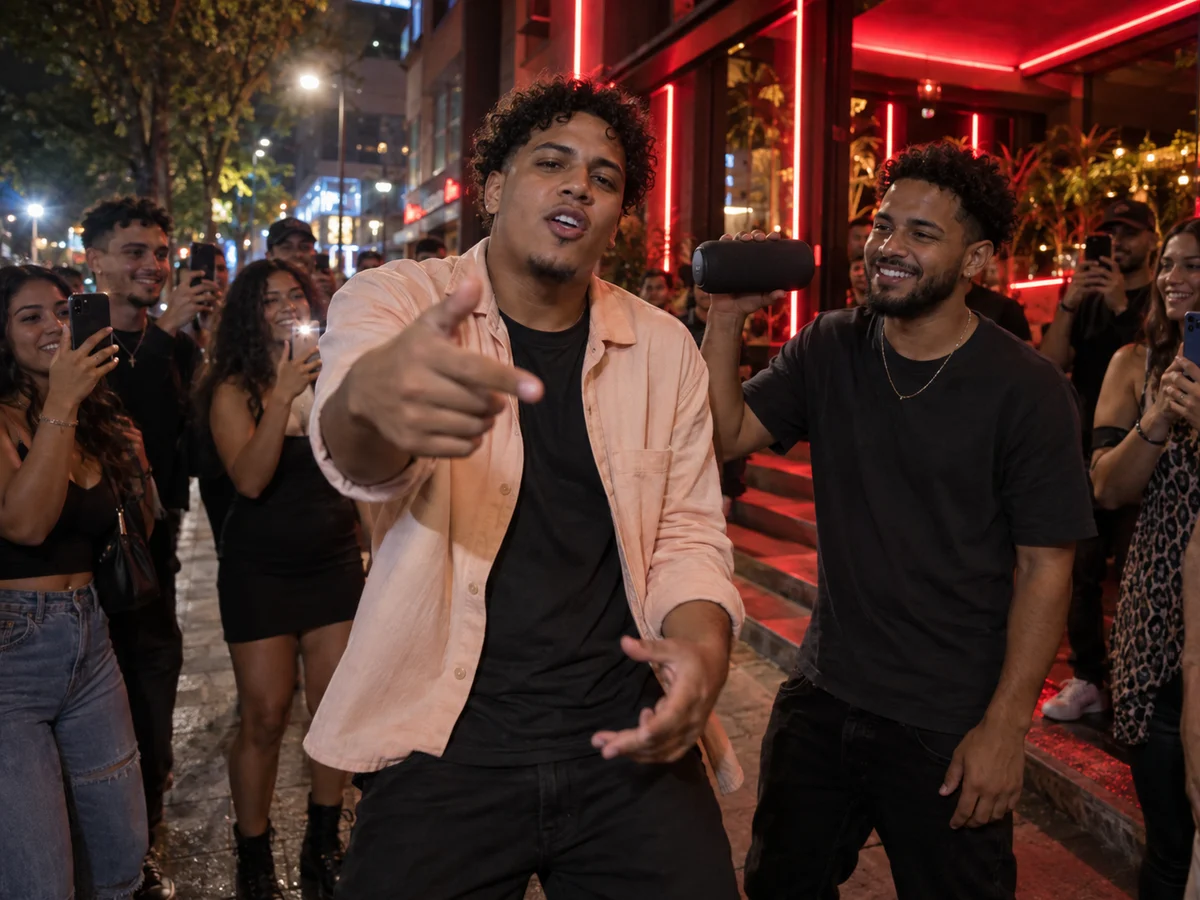
Bulin 47 AI concept with a freestyle performer, portable speaker, filming crowd, and red restaurant lights
Concept illustration of the Bulin 47 AI setting and composition. Actual results vary.

Give the face and gestures room to read

For Bulin 47 AI, a sharp face is more useful than an elaborate background. Pick a front-facing or gently angled portrait with natural light, a readable hairstyle, and visible shoulders. A waist-up crop can provide more guidance for arm movement than a tightly cropped face.

You do not need a red-lit source photograph. An evenly exposed image gives the model clearer appearance information before it interprets the nighttime setting. Open the original file at full size to check focus; a thumbnail can hide compression, smeared facial details, or a crop that cuts through the wrists.

  • Keep one intended performer clearly separated from other people and background objects.
  • Leave space beside the shoulders and hands so the starting composition feels open.
  • Choose an outfit with visible shapes and colors rather than relying on tiny lettering.
  • Avoid strong beauty filters, heavy blur, or objects that hide the eyes and mouth.

Bulin 47 AI settings and output choices

Bulin 47 AI uses Seedance 2 Mini with the same input controls as the homepage generator. The prepared instructions favor a vertical 12–15 second performance, while the settings retain the full supported range. Your selected duration and aspect ratio determine the submitted output parameters.

Choose 9:16 for a vertical feed, 1:1 for a square composition, or a landscape format when the edit needs horizontal space. Avoid assuming that changing the ratio only adds a border: the model can compose the scene differently. Pick the intended destination before generating when you want to minimize later cropping.

A shorter duration concentrates the action into less time, while a longer selection leaves more room for gestures to develop. Higher resolution provides more pixels for the delivered frame but cannot repair an unclear source image. The 19-second silent example above is a separate preview; it does not extend the generator’s duration range.

SettingAvailable optionsDefault
Starting imageOne required photo; no end frameYour uploaded image
Video modelSeedance 2 MiniSeedance 2 Mini
Aspect ratio16:9 · 4:3 · 1:1 · 3:4 · 9:16 · 21:9 · 9:21 · Auto9:16
Resolution480p or 720p720p
Duration5–15 seconds, in whole seconds12 seconds
Output quantityOne video per submissionOne clip
Review credit plans

Review your Bulin 47 AI performance before sharing

Watch the face during the fastest gestures, then check the hands, speaker, and crowd where objects overlap. A strong opening image does not guarantee consistent details in every moving frame. Review the ending as carefully as the first few seconds, especially if the performer leans toward the camera.

For your Bulin 47 AI review, play the clip at normal speed first, then pause around moments where a hand crosses the face or someone passes behind the performer. Check whether nearby objects keep a coherent shape. A still frame can reveal an artifact, but normal playback tells you how noticeable it actually feels.

For a second Bulin 47 AI attempt, change one variable at a time. Try a clearer image when identity is the issue, or revisit framing when the hands feel cramped. This makes comparisons more useful than changing the portrait, duration, and layout together without knowing which choice helped.

Before exporting an edit for a vertical feed, check where captions and interface buttons will sit over the picture. Keep your added text away from the performer’s face and pointing hand. Preview the final crop on a phone, where small details are harder to judge than on a desktop. Save the downloaded clip before making further edits so you can return to the original version if a crop or soundtrack choice does not work.

Bulin 47 AI questions, answered

The instructions ask the model to keep your face, hair, skin tone, body, and clothing consistent. That is a creative target, not a guaranteed identity lock. Facial proportions, accessories, and fabric details can shift during motion. Compare the completed clip with your reference before deciding whether the likeness is suitable.

No. Bulin 47 AI generates from your image and written scene instructions. The example is displayed for viewing; it is not sent with your request as a motion reference. Timing and choreography therefore vary between attempts. Treat the preview as a way to understand the theme, rather than a sequence the model must trace.

No original song, lyrics track, or voice sample is supplied with this preset. Its lip-syncing instruction does not reproduce your voice or guarantee exact words. Listen to any audio in the finished file, then add music you have permission to use if your edit needs a particular beat or recognizable soundtrack.

A submitted task may need time to queue, generate, and prepare its result. There is no guaranteed completion time shown by this page. Check the existing task before submitting again: another click that starts a new generation creates a separate request. If an error appears, use that message to guide the next step.

The upload is intended to guide the main performer. Bulin 47 AI has no separate role assignment for the speaker holder or crowd, so adding several people to the source does not give each person a controlled part. Background identities are interpreted by the model and may differ across frames or attempts.

This is an independent creative tool on Burning Bridges AI, not an official product or endorsement from Bulin 47. Use photos you own or have permission to animate. When sharing, describe the result as an AI edit and follow the destination’s labeling requirements rather than presenting the performance as footage of a real event.

Create your own Bulin 47 AI moment

Choose a portrait with a clear expression, keep room for the gestures, and start with the vertical preset. For a different performance mood, explore Burning Bridges AI on the homepage and bring your photo into its party scene.

Make a Bulin 47 AI video
Explore Burning Bridges AI
Burning Bridges AI logoBurning Bridges AI

Turn one image into your own Burning Bridges AI party video.

Customer supportsupport@burning-bridges-ai.pro

Learn more

  • How to Make a Burning Bridges AI Video
  • The Drake Burning Bridges Meme, Explained
  • Pricing

Tools

  • Rumpelstiltskin AI
  • Bulin 47 AI

Legal

  • Privacy Policy
  • Terms of Service
  • Refund Policy
  • Contact

© 2026 Burning Bridges AI